Today we are proud to announce the official release of DomainGuard: Customer Domain Router for JSM on the Atlassian Marketplace.
Built natively on the Atlassian Forge platform, DomainGuard solves one of the most persistent operational and security headaches for B2B support desks: automatically grouping customers into the right Jira Service Management (JSM) Organizations based on their email domain, while safeguarding your portal against accidental multi-tenant data leaks.
The JSM Customer Organization Challenge
In Jira Service Management, Organizations are the cornerstone of multi-tenant B2B customer support. By grouping users into organizations, clients can share support tickets across their internal teams, collaborate on active incidents, and view company-wide request histories directly from the customer portal.
However, support leaders and Jira administrators regularly run into severe native limitations:
- The 10-Domain Hard Ceiling: Native JSM limits each organization to a maximum of 10 email domains. In modern enterprise support, multinational clients frequently operate across dozens of brand domains, regional TLDs, and corporate subsidiaries. Hitting this limit forces admins into clunky manual workarounds.
- No Retroactive Sync: Native JSM domain associations only trigger when a brand new customer creates an account. If your site already has hundreds or thousands of existing customers, JSM ignores them. You are left manually clicking through customer profiles or maintaining brittle scripts.
- The Freemail Hazard & Data Leak Risks: If a customer submits a ticket from a public email provider like
@gmail.com,@outlook.com, or@yahoo.com, or if domain rules are loosely configured, unrelated end-users can accidentally be grouped into the same client organization. The result is catastrophic: competitors or random users gaining portal visibility into sensitive support conversations and SLA contracts. - Fragile Jira Automation Workarounds: Many teams try to patch this gap with Jira Automation. But building one automation rule per client quickly exhausts monthly execution limits, offers no wildcard subdomain support, and provides zero visibility when a routing rule fails.
How DomainGuard Solves Customer Routing
DomainGuard was engineered to replace manual administration and fragile automation with an enterprise-grade, set-and-forget routing engine.
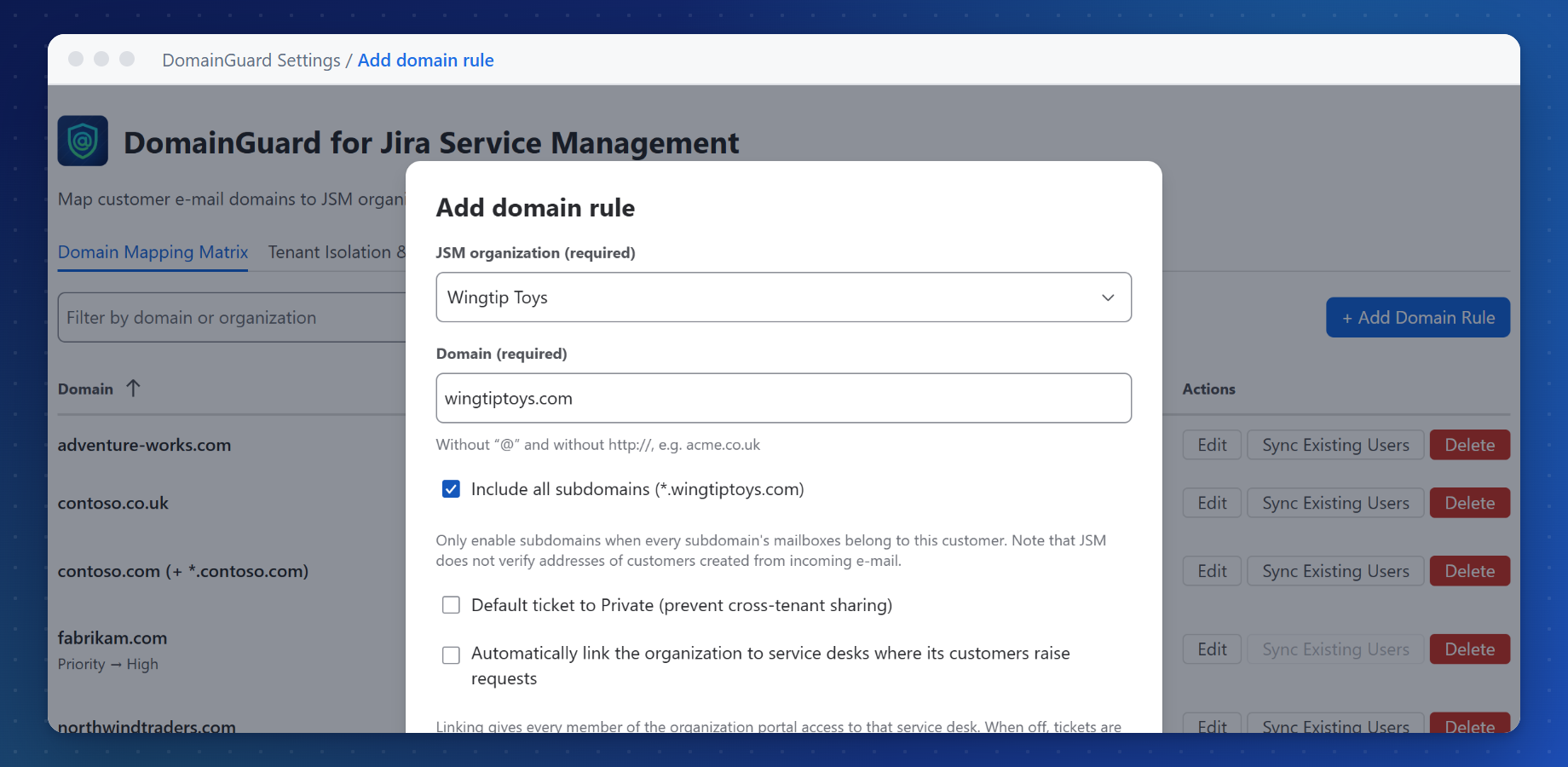
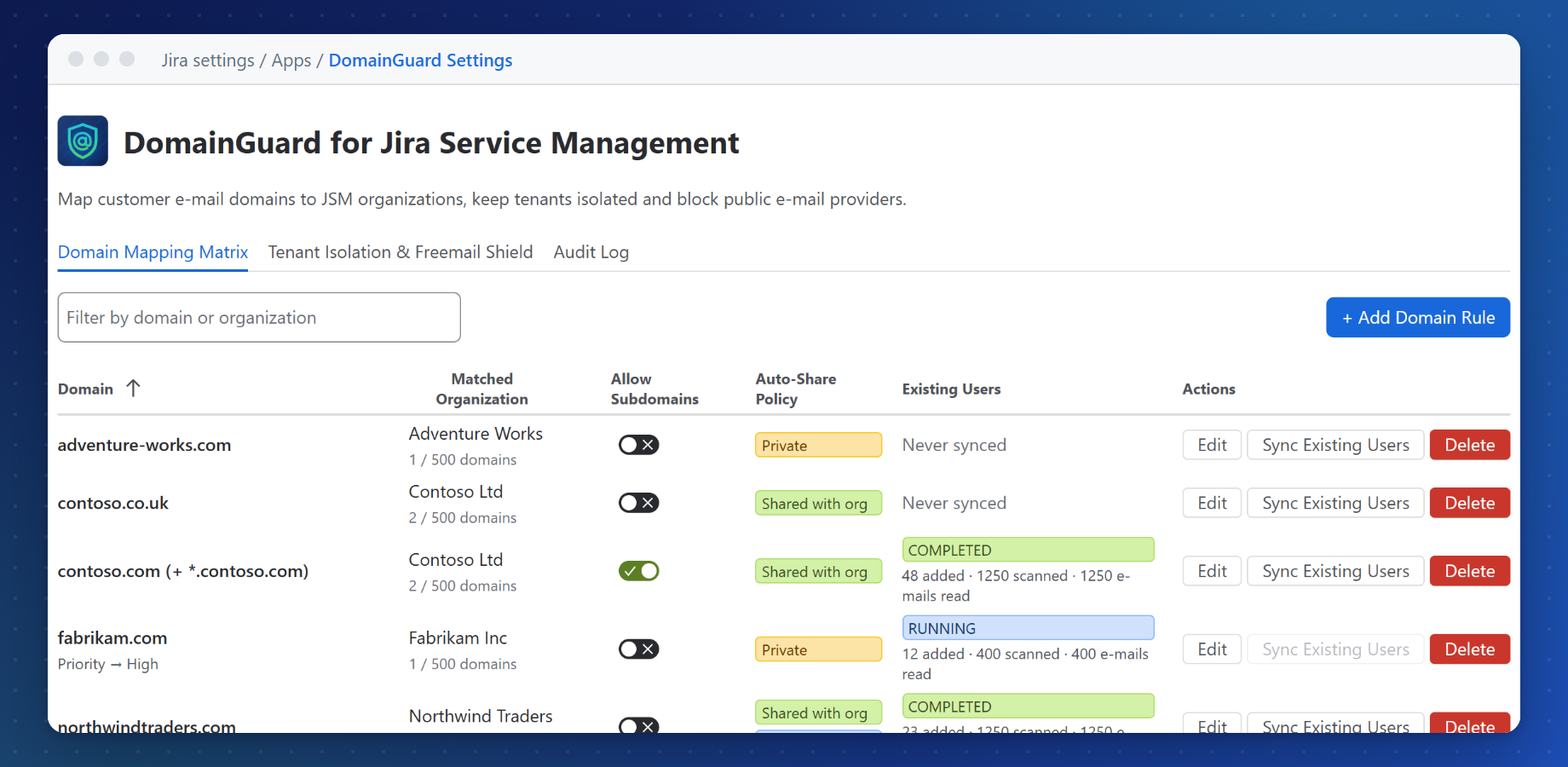
1. Domain Mapping Matrix (Up to 500 Domains per Org)
Expand your domain capacity from JSM's native limit of 10 up to 500 email domains per organization.
- Support wildcard subdomains (e.g.,
*.subsidiary.acme.com). - Scope rules to specific service desk projects so enterprise clients only access the portals they are entitled to.
- Set custom priority overrides automatically for high-tier accounts.
- Choose whether newly routed organizations are automatically linked to portal service desks.
2. Freemail Shield (30,000+ Providers Blocked)
Safeguarding tenant privacy should not require constant vigilance. DomainGuard features a built-in Freemail Shield containing more than 30,000 known public, disposable, and temporary email domains (including Gmail, Yahoo, Outlook, ProtonMail, and temp-mail services).
Freemail domains can never be mapped to a customer organization. When a request arrives from a public provider, DomainGuard immediately applies the quarantine-freemail label and isolates the ticket, preventing accidental cross-tenant data exposure. Admins can also configure custom blocked domains or define trusted corporate exceptions.
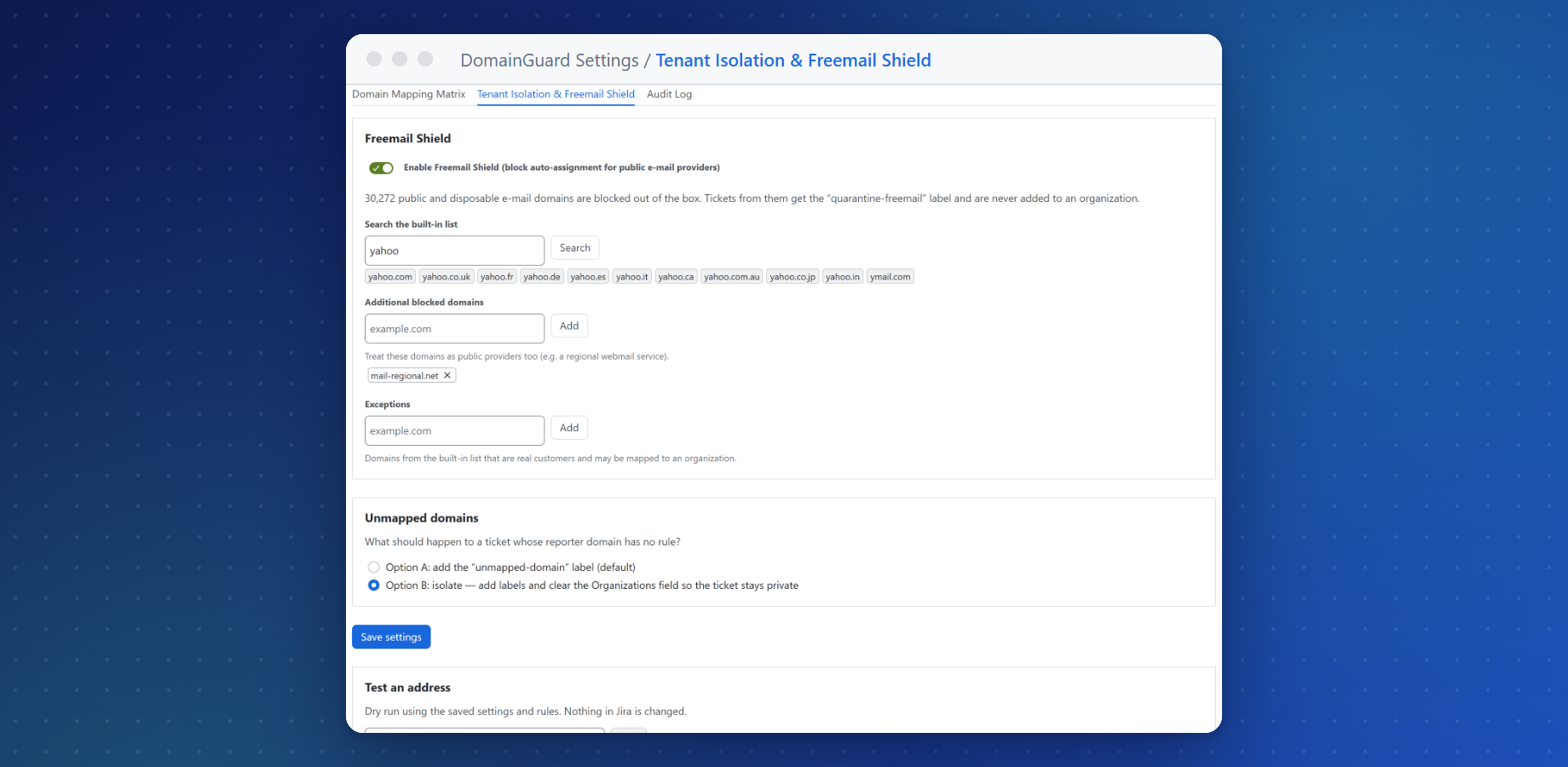
3. Tenant Isolation for Unmapped Domains
What happens when a ticket arrives from a domain you haven't configured yet? DomainGuard offers strict Tenant Isolation. Unrecognized domains can be automatically tagged with unmapped-domain or placed in full quarantine (quarantine-unmapped) with the Organizations field completely cleared until an agent or admin verifies the customer.
4. Background Sync for Existing Customers
Adding a new enterprise account to your service desk? With one click on Sync Existing Users, DomainGuard triggers a background queue worker that scans all registered portal customers. Anyone matching your domain rules is automatically linked to their respective organization, complete with live progress tracking and zero browser timeouts.
5. 30-Day Audit Log & One-Click Retry
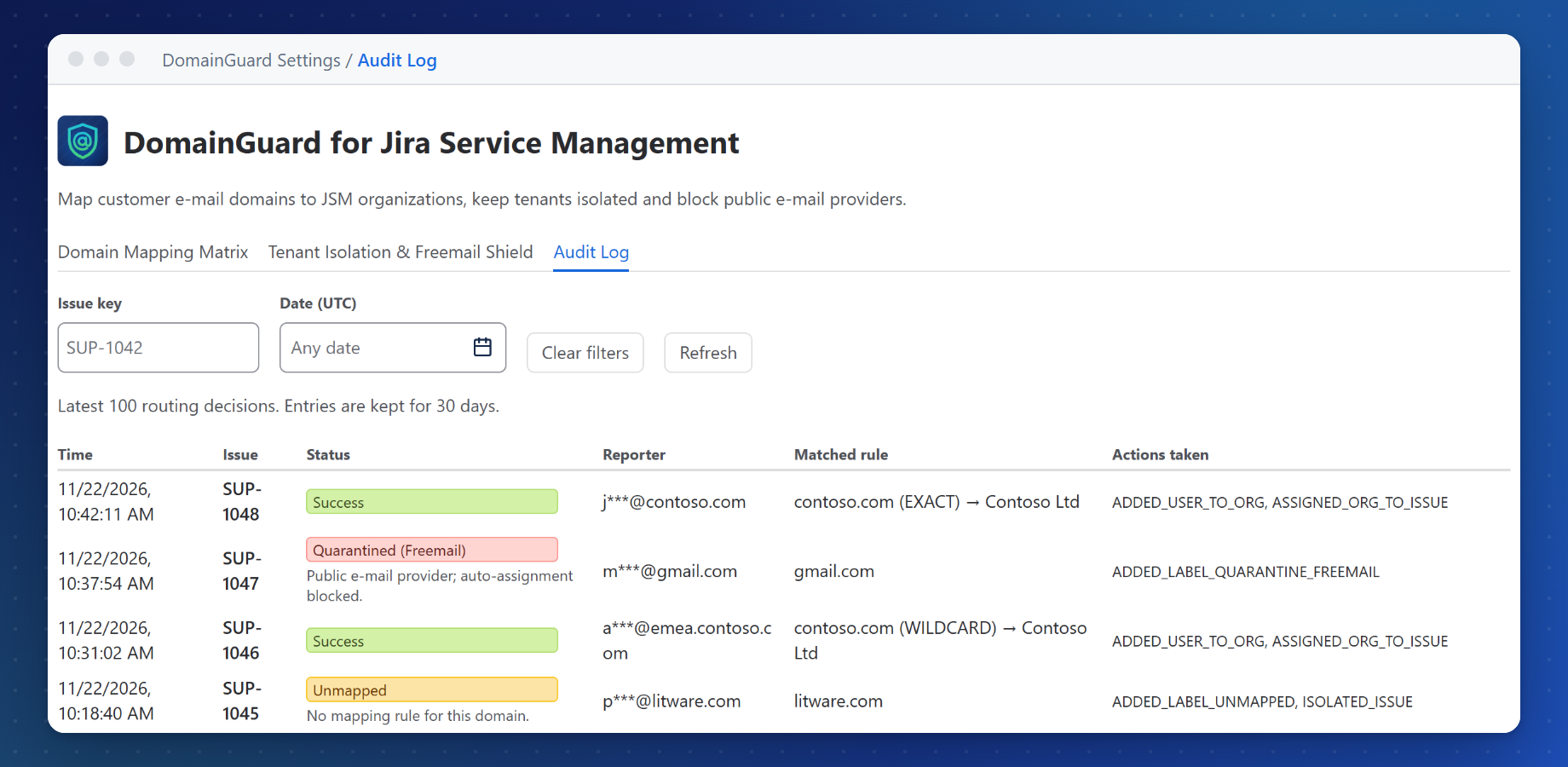
DomainGuard maintains a comprehensive 30-day audit log of every single routing decision.
- View the exact incoming issue key, matched rule, applied organization, and quarantine reasons.
- Privacy First: Email addresses are automatically masked (
c***@acme.com) in compliance with privacy regulations. - One-Click Retry: If a ticket was quarantined because a new domain hadn't been added yet, simply add the rule and hit Retry right from the audit log to re-process the ticket instantly.
6. Address Dry-Run Sandbox
Wondering how a complex address or deep subdomain will be routed? Use the built-in Test an Address tool in the DomainGuard settings to simulate routing against your active rules and Freemail Shield before anything touches production.
100% Forge-Native: Runs on Atlassian
Security and compliance are non-negotiable for enterprise support portals. DomainGuard is built exclusively on Atlassian Forge and meets all requirements for the Runs on Atlassian program:
- Zero External Egress: Customer data, email addresses, and issue details never leave Atlassian Cloud.
- Zero Third-Party Databases: All mapping rules, audit logs, and configurations are stored securely inside Atlassian's encrypted Key-Value Storage.
- Zero External Infrastructure: No third-party servers, middleware, or external processing pipelines.
Your data stays exactly where it belongs — inside your Atlassian Cloud site.
Get Started in Under 5 Minutes
Setting up DomainGuard requires no code, no API tokens, and no complicated webhooks:
- Install DomainGuard: Customer Domain Router for JSM from the Atlassian Marketplace.
- In Jira, navigate to Jira Settings → Apps → DomainGuard.
- Create your first domain rule (e.g.
acme.com→ Acme Corp). - Click Sync Existing Users to backfill existing customer accounts.
- Enjoy completely hands-free, secure customer organization routing!
DomainGuard is available today with a 30-day fully functional free trial.
- Marketplace Listing: Install DomainGuard on Atlassian Marketplace
- Product Overview: DomainGuard for Jira Service Management
- End-User Documentation: DomainGuard Knowledge Base
- Support & Inquiries: Reach out to our team anytime at support@collectly.cloud.